Other posts about EVPN/VXLAN in Proxmox VE:
- Configuring VXLAN in Proxmox VE
- Configuring EVPN for L2 VXLAN in Proxmox VE
- EVPN ARP/ND Suppression in Proxmox VE (this post)
Let’s continue inspecting ARP and ND suppression features when using EVPN in Proxmox Virtual Environment (PVE).
Initial setup
I still have the EVPN1 VNet (VNI = 5001) configured in the PVE cluster (from the previous post), with no IP subnet configured for the VNet.
VM1 is on the PVE node pve1, with the ens19 network interface configured and connected to EVPN1:
markku@vm1:~$ ip addr show dev ens19
3: ens19: <BROADCAST,MULTICAST,UP,LOWER_UP> mtu 1500 qdisc fq_codel state UP group default qlen 1000
    link/ether bc:24:11:00:00:01 brd ff:ff:ff:ff:ff:ff
    inet 10.2.1.11/24 scope global ens19
       valid_lft forever preferred_lft forever
    inet6 fe80::be24:11ff:fe00:1/64 scope link proto kernel_ll
       valid_lft forever preferred_lft forever
markku@vm1:~$
Two EVPN type 2 routes are immediately announced:
pve1# show bgp evpn route type 2
BGP table version is 6, local router ID is 192.168.16.1
Status codes: s suppressed, d damped, h history, * valid, > best, i - internal
Origin codes: i - IGP, e - EGP, ? - incomplete
EVPN type-1 prefix: [1]:[EthTag]:[ESI]:[IPlen]:[VTEP-IP]:[Frag-id]
EVPN type-2 prefix: [2]:[EthTag]:[MAClen]:[MAC]:[IPlen]:[IP]
EVPN type-3 prefix: [3]:[EthTag]:[IPlen]:[OrigIP]
EVPN type-4 prefix: [4]:[ESI]:[IPlen]:[OrigIP]
EVPN type-5 prefix: [5]:[EthTag]:[IPlen]:[IP]

   Network          Next Hop            Metric LocPrf Weight Path
                    Extended Community
Route Distinguisher: 192.168.16.1:2
 *>  [2]:[0]:[48]:[bc:24:11:00:00:01]
                    192.168.16.1(pve1)
                                                       32768 i
                    ET:8 RT:65001:5001
 *>  [2]:[0]:[48]:[bc:24:11:00:00:01]:[128]:[fe80::be24:11ff:fe00:1]
                    192.168.16.1(pve1)
                                                       32768 i
                    ET:8 RT:65001:5001

Displayed 2 prefixes (2 paths) (of requested type)
pve1#
When the NIC was connected on VM1, it started sending multicast listener report messages and router solicitations, so the PVE node (pve1) saw the packets and learned the MAC address, thus the first EVPN type 2 route for the MAC address.
Let’s see the EVPN1 interface on pve1:
root@pve1:~# ip addr show dev EVPN1
64: EVPN1: <BROADCAST,MULTICAST,UP,LOWER_UP> mtu 1500 qdisc noqueue master vrf_EZone1 state UP group default qlen 1000
    link/ether bc:24:11:aa:aa:a1 brd ff:ff:ff:ff:ff:ff
    inet6 fe80::be24:11ff:feaa:aaa1/64 scope link proto kernel_ll
       valid_lft forever preferred_lft forever
root@pve1:~# sysctl net.ipv6.conf.EVPN1.disable_ipv6
net.ipv6.conf.EVPN1.disable_ipv6 = 0
root@pve1:~#
The EVPN1 interface has IPv6 enabled, as is usual by default, with the link-local address based on the MAC address, and thus the PVE node was able to receive the IPv6 packets from the VM and then announce the MAC+IPv6 address route to the EVPN fabric.
Let’s try disabling IPv6 on EVPN1 and see what happens:
root@pve1:~# sysctl -w net.ipv6.conf.EVPN1.disable_ipv6=1
net.ipv6.conf.EVPN1.disable_ipv6 = 1
root@pve1:~# sysctl net.ipv6.conf.EVPN1.disable_ipv6
net.ipv6.conf.EVPN1.disable_ipv6 = 1
root@pve1:~#
In the pve1 packet capture I immediately saw BGP UPDATE messages:
Time             Source        Destination   Info
12:53:05,913282  192.168.16.1  192.168.16.2  BGP UPDATE Message
12:53:05,913283  192.168.16.1  192.168.16.4  BGP UPDATE Message
12:53:05,913284  192.168.16.1  192.168.16.3  BGP UPDATE Message
pve1 withdrew the EVPN type 2 route for the fe80::be24:11ff:fe00:1/64 (VM1) address, and now only the MAC address route is left:
pve1# show bgp evpn route type 2
...
EVPN type-2 prefix: [2]:[EthTag]:[MAClen]:[MAC]:[IPlen]:[IP]
...
   Network          Next Hop            Metric LocPrf Weight Path
                    Extended Community
Route Distinguisher: 192.168.16.1:2
 *>  [2]:[0]:[48]:[bc:24:11:00:00:01]
                    192.168.16.1(pve1)
                                                       32768 i
                    ET:8 RT:65001:5001

Displayed 1 prefixes (1 paths) (of requested type)
pve1#
pve1 will keep the VM1 MAC address route active in the EVPN fabric as long as it can see traffic from the MAC address. VM1 will keep sending at least the router solicitations in some intervals even without other traffic, but at some point the router solicitation intervals will get longer than 5 minutes and the MAC address route will disappear for a while, until further traffic is sawn again.
I’ll re-enable IPv6 on the EVPN1 interface on the PVE node, just to be sure that we are back in the default behavior of PVE:
root@pve1:~# sysctl -w net.ipv6.conf.EVPN1.disable_ipv6=0
net.ipv6.conf.EVPN1.disable_ipv6 = 0
root@pve1:~#
After some IPv6 traffic from VM1 we have the same two EVPN type 2 routes back again:
pve1# show bgp evpn route type 2
...
Displayed 2 prefixes (2 paths) (of requested type)
pve1#
ND suppression
Now, to actually proceed to ARP/ND suppression demonstration, I’ll add another VM (VM2) to EVPN1, on node pve4.
markku@vm2:~$ ip addr show dev ens19
3: ens19: <BROADCAST,MULTICAST,UP,LOWER_UP> mtu 1500 qdisc fq_codel state UP group default qlen 1000
    link/ether bc:24:11:00:00:02 brd ff:ff:ff:ff:ff:ff
    inet 10.2.1.12/24 scope global ens19
       valid_lft forever preferred_lft forever
    inet6 fe80::be24:11ff:fe00:2/64 scope link proto kernel_ll
       valid_lft forever preferred_lft forever
markku@vm2:~$
Two more EVPN type 2 routes were announced as expected, originating from pve4:
pve1# show bgp evpn route type 2
...
EVPN type-2 prefix: [2]:[EthTag]:[MAClen]:[MAC]:[IPlen]:[IP]
...
   Network          Next Hop            Metric LocPrf Weight Path
                    Extended Community
Route Distinguisher: 192.168.16.1:2
 *>  [2]:[0]:[48]:[bc:24:11:00:00:01]
                    192.168.16.1(pve1)
                                                       32768 i
                    ET:8 RT:65001:5001
 *>  [2]:[0]:[48]:[bc:24:11:00:00:01]:[128]:[fe80::be24:11ff:fe00:1]
                    192.168.16.1(pve1)
                                                       32768 i
                    ET:8 RT:65001:5001
Route Distinguisher: 192.168.16.4:2
 *>i [2]:[0]:[48]:[bc:24:11:00:00:02]
                    192.168.16.4(pve4)
                                                  100      0 i
                    RT:65001:5001 ET:8
 *>i [2]:[0]:[48]:[bc:24:11:00:00:02]:[128]:[fe80::be24:11ff:fe00:2]
                    192.168.16.4(pve4)
                                                  100      0 i
                    RT:65001:5001 ET:8

Displayed 4 prefixes (4 paths) (of requested type)
pve1#
I’ll start tcpdump on VM1 and VM2, and then ping VM2 link-local address from VM1:
markku@vm1:~$ ip -6 neigh show dev ens19
markku@vm1:~$ ping fe80::be24:11ff:fe00:2%ens19
PING fe80::be24:11ff:fe00:2%ens19 (fe80::be24:11ff:fe00:2%ens19) 56 data bytes
64 bytes from fe80::be24:11ff:fe00:2%ens19: icmp_seq=1 ttl=64 time=0.574 ms
64 bytes from fe80::be24:11ff:fe00:2%ens19: icmp_seq=2 ttl=64 time=0.549 ms
^C
--- fe80::be24:11ff:fe00:2%ens19 ping statistics ---
2 packets transmitted, 2 received, 0% packet loss, time 1021ms
rtt min/avg/max/mdev = 0.549/0.561/0.574/0.012 ms
markku@vm1:~$ ip -6 neigh show dev ens19
fe80::be24:11ff:fe00:2 lladdr bc:24:11:00:00:02 REACHABLE
markku@vm1:~$
Let’s see the tcpdump outputs, first on VM1:
markku@vm1:~$ sudo tcpdump -i ens19 -n ip6
...
13:13:31.856433 IP6 fe80::be24:11ff:fe00:1 > ff02::1:ff00:2: ICMP6, neighbor solicitation, who has fe80::be24:11ff:fe00:2, length 32
13:13:31.856537 IP6 fe80::be24:11ff:fe00:2 > fe80::be24:11ff:fe00:1: ICMP6, neighbor advertisement, tgt is fe80::be24:11ff:fe00:2, length 32
13:13:31.856560 IP6 fe80::be24:11ff:fe00:1 > fe80::be24:11ff:fe00:2: ICMP6, echo request, id 8, seq 1, length 64
13:13:31.856966 IP6 fe80::be24:11ff:fe00:2 > fe80::be24:11ff:fe00:1: ICMP6, echo reply, id 8, seq 1, length 64
13:13:32.877098 IP6 fe80::be24:11ff:fe00:1 > fe80::be24:11ff:fe00:2: ICMP6, echo request, id 8, seq 2, length 64
13:13:32.877616 IP6 fe80::be24:11ff:fe00:2 > fe80::be24:11ff:fe00:1: ICMP6, echo reply, id 8, seq 2, length 64
^C
markku@vm1:~$
There is the neighbor solicitation (NS) message, followed by neighbor advertisement (NA) in just ~0.1 milliseconds, and then two ping requests with responses.
On VM2:
markku@vm2:~$ sudo tcpdump -i ens19 -n ip6
...
13:13:31.959210 IP6 fe80::be24:11ff:fe00:1 > fe80::be24:11ff:fe00:2: ICMP6, echo request, id 8, seq 1, length 64
13:13:31.959269 IP6 fe80::be24:11ff:fe00:2 > ff02::1:ff00:1: ICMP6, neighbor solicitation, who has fe80::be24:11ff:fe00:1, length 32
13:13:31.959299 IP6 fe80::be24:11ff:fe00:1 > fe80::be24:11ff:fe00:2: ICMP6, neighbor advertisement, tgt is fe80::be24:11ff:fe00:1, length 32
13:13:31.959308 IP6 fe80::be24:11ff:fe00:2 > fe80::be24:11ff:fe00:1: ICMP6, echo reply, id 8, seq 1, length 64
13:13:32.979731 IP6 fe80::be24:11ff:fe00:1 > fe80::be24:11ff:fe00:2: ICMP6, echo request, id 8, seq 2, length 64
13:13:32.979747 IP6 fe80::be24:11ff:fe00:2 > fe80::be24:11ff:fe00:1: ICMP6, echo reply, id 8, seq 2, length 64
^C
markku@vm2:~$
The clocks on the VMs are not exactly synchronized to the millisecond I see, but the important detail here is that the ping request got here first, with no neighbor solicitation message from VM1.
That’s ND suppression at work right there: The ingress PVE node (pve1) already had the EVPN type 2 MAC+IPv6 address route, so it responded to the NS message locally, so the first packet from VM1 all the way to VM2 was the ping packet.
Then VM2 wanted to respond to the ping request, so it sent NS for VM1’s address, got NA message from pve4 (again, responded locally based on the EVPN routes), and finally VM2 was able to send the ping response to VM1.
At this point let’s also see how the VM addresses are shown in the Linux networking stack on pve1:
root@pve1:~# ip vrf
Name              Table
-----------------------
vrf_EZone1        1001
root@pve1:~# ip route show vrf vrf_EZone1
unreachable default metric 4278198272
root@pve1:~# ip neigh show vrf vrf_EZone1
fe80::be24:11ff:fe00:2 dev EVPN1 lladdr bc:24:11:00:00:02 extern_learn NOARP proto zebra
fe80::be24:11ff:fe00:1 dev EVPN1 lladdr bc:24:11:00:00:01 STALE
root@pve1:~# bridge fdb | grep bc:24:11:00:00
bc:24:11:00:00:02 dev vxlan_EVPN1 vlan 1 extern_learn master EVPN1
bc:24:11:00:00:02 dev vxlan_EVPN1 extern_learn master EVPN1
bc:24:11:00:00:02 dev vxlan_EVPN1 dst 192.168.16.4 self extern_learn
bc:24:11:00:00:01 dev tap503i1 master EVPN1
root@pve1:~#
PVE SDN created a VRF (Virtual Routing and Forwarding) instance for the EVPN zone. There are no IPv4 or IPv6 routes (as we didn’t configure any IP interfaces in the VNet in PVE). The VM IPv6 addresses are found in the neighbor table. VM1 MAC address was learned locally on the VM-attached tap503i1 interface, and VM2 MAC address was programmed externally by the EVPN fabric.
ARP suppression
In the demonstration above we saw ND suppression working, so let’s also see how ARP suppression works with IPv4 traffic.
You know the drill, first the pinging from VM1 to VM2, then tcpdump outputs from both VMs:
markku@vm1:~$ ip -4 neigh show dev ens19
markku@vm1:~$ ping 10.2.1.12
PING 10.2.1.12 (10.2.1.12) 56(84) bytes of data.
64 bytes from 10.2.1.12: icmp_seq=1 ttl=64 time=0.809 ms
64 bytes from 10.2.1.12: icmp_seq=2 ttl=64 time=0.452 ms
^C
--- 10.2.1.12 ping statistics ---
2 packets transmitted, 2 received, 0% packet loss, time 1016ms
rtt min/avg/max/mdev = 0.452/0.630/0.809/0.178 ms
markku@vm1:~$ ip -4 neigh show dev ens19
10.2.1.12 lladdr bc:24:11:00:00:02 REACHABLE
markku@vm1:~$

markku@vm1:~$ sudo tcpdump -i ens19 -n arp or ip
...
14:45:14.293410 ARP, Request who-has 10.2.1.12 tell 10.2.1.11, length 28
14:45:14.293864 ARP, Reply 10.2.1.12 is-at bc:24:11:00:00:02, length 28
14:45:14.293872 IP 10.2.1.11 > 10.2.1.12: ICMP echo request, id 19, seq 1, length 64
14:45:14.294178 IP 10.2.1.12 > 10.2.1.11: ICMP echo reply, id 19, seq 1, length 64
14:45:15.309077 IP 10.2.1.11 > 10.2.1.12: ICMP echo request, id 19, seq 2, length 64
14:45:15.309504 IP 10.2.1.12 > 10.2.1.11: ICMP echo reply, id 19, seq 2, length 64
^C
markku@vm1:~$

markku@vm2:~$ sudo tcpdump -i ens19 -n arp or ip
...
14:45:14.400338 ARP, Request who-has 10.2.1.12 tell 10.2.1.11, length 28
14:45:14.400352 ARP, Reply 10.2.1.12 is-at bc:24:11:00:00:02, length 28
14:45:14.400675 IP 10.2.1.11 > 10.2.1.12: ICMP echo request, id 19, seq 1, length 64
14:45:14.400686 IP 10.2.1.12 > 10.2.1.11: ICMP echo reply, id 19, seq 1, length 64
14:45:15.415941 IP 10.2.1.11 > 10.2.1.12: ICMP echo request, id 19, seq 2, length 64
14:45:15.415955 IP 10.2.1.12 > 10.2.1.11: ICMP echo reply, id 19, seq 2, length 64
^C
markku@vm2:~$
The tcpdump outputs look too similar, right? That is true, the ARP request from VM1 reached VM2 without any suppression.
This might not be a surprise after all, because there is no MAC+IPv4 address route in the EVPN fabric.
That is because there is no IPv4 interface in the EVPN fabric for this VNet, so there is no way the EVPN fabric to “catch” the IPv4 packets.
Let’s add IPv4 subnet to the EVPN1 VNet, by going to SDN – VNets – EVPN1 – Subnets – Create:
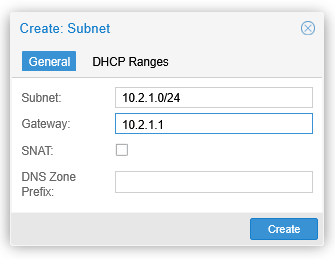
The gateway address is the IPv4 anycast address configured on each EVPN node so that they can all respond to that locally and route the traffic sent to the gateway address. (Note that in this demo setup there is still only this one subnet attached to the EVPN zone, so there isn’t actually anything to route to, but anyway.)
Even after applying this SDN config in the PVE cluster, testing the ARP suppression by pinging VM2 from VM1 did not yield any better results. The ARP requests were still flooded through the EVPN VNet, and there were no EVPN type 2 routes for the MAC+IPv4 addresses.
I take this so that the EVPN nodes in the EVPN1 VNet are still unaware of the VMs in the 10.2.1.0/24 network because they haven’t “seen” any IPv4 packets yet. Remember: ARP packets are not IPv4 packets, as shown in this example:
> Internet Protocol Version 4, Src: 192.168.16.1, Dst: 192.168.16.3
> User Datagram Protocol, Src Port: 34740, Dst Port: 4789
> Virtual eXtensible Local Area Network, VNI: 5001, GP ID: 0
> Ethernet II, Src: ProxmoxServe_00:00:01 (bc:24:11:00:00:01), Dst: Broadcast (ff:ff:ff:ff:ff:ff)
> Address Resolution Protocol (request)
There is no IPv4 header between the Ethernet header and ARP packet.
Only after pinging the 10.2.1.1 address (the EVPN anycast gateway address of the subnet) from both VMs the type 2 routes for the VM MAC+IPv4 addresses are announced:
pve1# show bgp evpn route type 2
...
   Network          Next Hop            Metric LocPrf Weight Path
                    Extended Community
Route Distinguisher: 192.168.16.1:2
 *>  [2]:[0]:[48]:[bc:24:11:00:00:01]
                    192.168.16.1(pve1)
                                                       32768 i
                    ET:8 RT:65001:5001
 *>  [2]:[0]:[48]:[bc:24:11:00:00:01]:[32]:[10.2.1.11]
                    192.168.16.1(pve1)
                                                       32768 i
                    ET:8 RT:65001:5001 RT:65001:100001 Rmac:9a:f0:70:0b:1f:83
Route Distinguisher: 192.168.16.4:2
 *>i [2]:[0]:[48]:[bc:24:11:00:00:02]
                    192.168.16.4(pve4)
                                                  100      0 i
                    RT:65001:5001 ET:8
 *>i [2]:[0]:[48]:[bc:24:11:00:00:02]:[32]:[10.2.1.12]
                    192.168.16.4(pve4)
                                                  100      0 i
                    RT:65001:5001 RT:65001:100001 ET:8 Rmac:ae:cb:cc:0a:d0:fd

Displayed 4 prefixes (4 paths) (of requested type)
pve1#
Now, let’s test the VM-to-VM pinging again:
markku@vm1:~$ sudo ip neigh flush dev ens19
markku@vm1:~$ ping 10.2.1.12
PING 10.2.1.12 (10.2.1.12) 56(84) bytes of data.
64 bytes from 10.2.1.12: icmp_seq=1 ttl=64 time=0.869 ms
64 bytes from 10.2.1.12: icmp_seq=2 ttl=64 time=0.509 ms
^C
--- 10.2.1.12 ping statistics ---
2 packets transmitted, 2 received, 0% packet loss, time 1001ms
rtt min/avg/max/mdev = 0.509/0.689/0.869/0.180 ms
markku@vm1:~$ ip -4 neigh show dev ens19
10.2.1.12 lladdr bc:24:11:00:00:02 REACHABLE
markku@vm1:~$

markku@vm1:~$ sudo tcpdump -i ens19 -n arp or ip
...
15:13:13.416706 ARP, Request who-has 10.2.1.12 tell 10.2.1.11, length 28
15:13:13.416806 ARP, Reply 10.2.1.12 is-at bc:24:11:00:00:02, length 28
15:13:13.416814 IP 10.2.1.11 > 10.2.1.12: ICMP echo request, id 41, seq 1, length 64
15:13:13.417232 IP 10.2.1.12 > 10.2.1.11: ICMP echo reply, id 41, seq 1, length 64
15:13:14.445091 IP 10.2.1.11 > 10.2.1.12: ICMP echo request, id 41, seq 2, length 64
15:13:14.445567 IP 10.2.1.12 > 10.2.1.11: ICMP echo reply, id 41, seq 2, length 64
^C
markku@vm1:~$

markku@vm2:~$ sudo tcpdump -i ens19 -n arp or ip
...
15:13:13.527943 IP 10.2.1.11 > 10.2.1.12: ICMP echo request, id 41, seq 1, length 64
15:13:13.527961 ARP, Request who-has 10.2.1.11 tell 10.2.1.12, length 28
15:13:13.528000 ARP, Reply 10.2.1.11 is-at bc:24:11:00:00:01, length 28
15:13:13.528003 IP 10.2.1.12 > 10.2.1.11: ICMP echo reply, id 41, seq 1, length 64
15:13:14.556191 IP 10.2.1.11 > 10.2.1.12: ICMP echo request, id 41, seq 2, length 64
15:13:14.556206 IP 10.2.1.12 > 10.2.1.11: ICMP echo reply, id 41, seq 2, length 64
^C
markku@vm2:~$
Now we see proper ARP suppression pattern: VM1 sent ARP request, got immediate reply from the EVPN node (not from the destination host), and then started pinging (and it did not receive any ARP request from VM2). On the VM2 side the first packet is the ping request, then VM2 issued ARP request for VM1 (which was never propagated to VM1), and pings were running from there on.
ND suppression, revisited with global unicast addresses
Let’s go back to the ND case. In the ND suppression demonstration above, we targeted the link-local address of the destination VM, and the EVPN fabric properly handled the case.
But what if we are using IPv6 global unicast addresses? I’ll keep this part short, I’ll just say that there is the same problem as with ARP suppression above: it only works if there is an EVPN anycast address configured in the VNet. For example, if
- VM1 =
2001:db8::11/64 - VM2 =
2001:db8::12/64
then the EVPN fabric will not generate any type 2 MAC+IPv6 address routes for them, unless the VNet is configured with the same subnet and a gateway address, and the VMs somehow target the gateway address.
The same kind of behavior, that is, as with ARP suppression.
Closing words
In this presented VXLAN bridging scenario (i.e. using EVPN and VXLAN to create isolated virtual L2 segments, without EVPN-integrated routing) the ARP/ND suppression does not really kick in because the EVPN (PVE) nodes don’t see the traffic “properly” to generate the required EVPN type 2 MAC+IP address routes.
Regardless of that, the EVPN fabric still nicely and actively distributes the MAC address information between the PVE nodes, avoiding unknown unicast flooding that way.