In the earlier post Configuring VXLAN in Proxmox VE I showed L2 VXLAN data plane implementation on a Proxmox Virtual Environment (PVE) cluster. There was no special control plane for MAC learning so the PVE nodes learned the locations of MAC addresses just on the go, flooding the traffic as needed.
In this post I’ll add EVPN (Ethernet Virtual Private Network) control plane in the setup to actively distribute the MAC address information between the PVE nodes. The usage scenario is otherwise the same as earlier: an isolated network segment to be used between VMs inside the PVE cluster.
For expectation management: This is not an EVPN basics or technology tutorial; for that, please go to some other resource, like EVPN Technical Deep Dive by Ivan Pepelnjak, Dinesh Dutt, Lukas Krattiger and Krzysztof Szarkowicz. This post is about configuring and observing one kind of EVPN setup on a PVE cluster.
Creating an EVPN-based VNet
In SDN – Options – Controllers, I’ll add an EVPN controller:
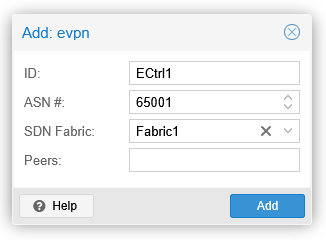
I’m using the existing OSPF fabric Fabric1 (from the Configuring VXLAN in Proxmox VE post) in the EVPN controller setup, instead of listing the EVPN peer addresses separately.
Proceeding then to add an EVPN zone in SDN – Zones:
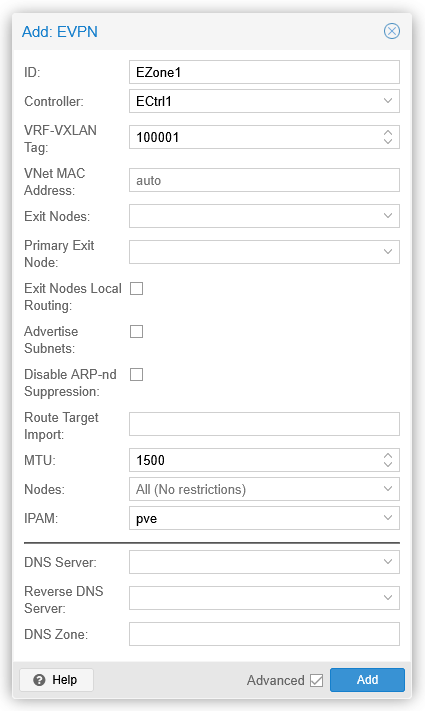
From the previous configurations, I’ll also delete VNet1 (in VNets) and VXLAN1 (in Zones). I’m removing them to get a bit cleaner outputs for this topic.
Now I’ll apply the configurations by using the Apply button on the SDN page.
Let’s see the BGP situation at this point on pve1 (all the command and capture outputs shown on this post have been edited for better fit for the page):
root@pve1:~# vtysh
...
pve1# show bgp l2vpn evpn summary
BGP router identifier 192.168.16.1, local AS number 65001 VRF default vrf-id 0
BGP table version 0
RIB entries 0, using 0 bytes of memory
Peers 3, using 71 KiB of memory
Peer groups 1, using 64 bytes of memory

Neighbor           AS  MsgRcvd MsgSent TblVer  Up/Down PfxRcd PfxSnt
pve2(192.168.16.2) 65001    17      16      0 00:00:39      0      0
pve3(192.168.16.3) 65001    17      16      0 00:00:39      0      0
pve4(192.168.16.4) 65001    17      16      0 00:00:39      0      0

Total number of neighbors 3
pve1# show bgp l2vpn evpn route
No prefixes displayed, 0 exist
pve1#
Here we can see a full mesh of established IBGP sessions between all four PVE nodes, with no EVPN routes announced yet by anyone.
Finally add a VNet in SDN – VNets:
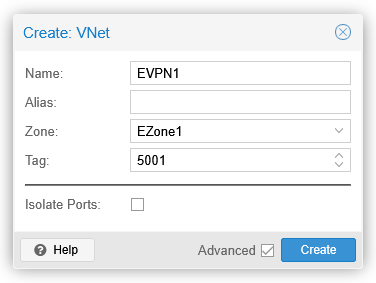
After applying this as well, we can see EVPN type 3 routes in the BGP table:
pve1# show bgp l2vpn evpn route
BGP table version is 2, local router ID is 192.168.16.1
Status codes: s suppressed, d damped, h history, * valid, > best, i - internal
Origin codes: i - IGP, e - EGP, ? - incomplete
EVPN type-1 prefix: [1]:[EthTag]:[ESI]:[IPlen]:[VTEP-IP]:[Frag-id]
EVPN type-2 prefix: [2]:[EthTag]:[MAClen]:[MAC]:[IPlen]:[IP]
EVPN type-3 prefix: [3]:[EthTag]:[IPlen]:[OrigIP]
EVPN type-4 prefix: [4]:[ESI]:[IPlen]:[OrigIP]
EVPN type-5 prefix: [5]:[EthTag]:[IPlen]:[IP]

   Network          Next Hop            Metric LocPrf Weight Path
                    Extended Community
Route Distinguisher: 192.168.16.1:7
 *>  [3]:[0]:[32]:[192.168.16.1]
                    192.168.16.1(pve1)
                                                       32768 i
                    ET:8 RT:65001:5001
Route Distinguisher: 192.168.16.2:7
 *>i [3]:[0]:[32]:[192.168.16.2]
                    192.168.16.2(pve2)
                                                  100      0 i
                    RT:65001:5001 ET:8
Route Distinguisher: 192.168.16.3:5
 *>i [3]:[0]:[32]:[192.168.16.3]
                    192.168.16.3(pve3)
                                                  100      0 i
                    RT:65001:5001 ET:8
Route Distinguisher: 192.168.16.4:13
 *>i [3]:[0]:[32]:[192.168.16.4]
                    192.168.16.4(pve4)
                                                  100      0 i
                    RT:65001:5001 ET:8

Displayed 4 prefixes (4 paths)
pve1#
These are the VTEP routes for VNI 5001, with the VNI encoded in an extended community.
The ET:8 community is the encapsulation type for the data plane, where 8 = VXLAN (defined in RFC 8365).
At this point there are no virtual machines connected to the EVPN1 VNet (with VNI 5001) yet.
EVPN route updates for a NIC
For a VM (VM1) on pve4, let’s enable and connect a new NIC to EVPN1:
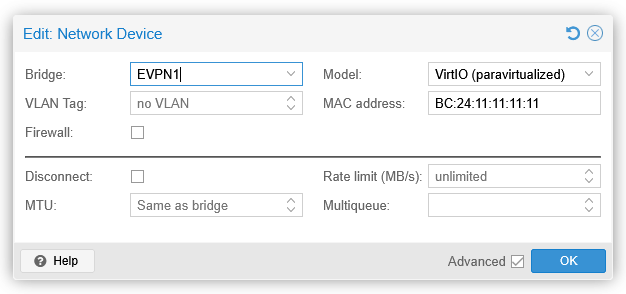
Immediately after clicking OK, a BGP UPDATE message was sent from pve4 to pve1:
Border Gateway Protocol - UPDATE Message
   Marker: ffffffffffffffffffffffffffffffff
   Length: 159
   Type: UPDATE Message (2)
   Withdrawn Routes Length: 0
   Total Path Attribute Length: 136
   Path attributes
      Path Attribute - MP_REACH_NLRI
       > Flags: 0x90, Optional, Extended-Length, Non-transitive, Complete
         Type Code: MP_REACH_NLRI (14)
         Length: 98
         Address family identifier (AFI): AFI for L2VPN information (25)
         Subsequent address family identifier (SAFI): EVPN (70)
       > Next hop: 192.168.16.4
         Number of Subnetwork points of attachment (SNPA): 0
         Network Layer Reachability Information (NLRI)
            EVPN NLRI: MAC Advertisement Route
               Route Type: MAC Advertisement Route (2)
               Length: 33
               Route Distinguisher: 0001c0a81004000d (192.168.16.4:13)
             > ESI: 00:00:00:00:00:00:00:00:00:00
               Ethernet Tag ID: 0
               MAC Address Length: 48
               MAC Address: ProxmoxServe_11:11:11 (bc:24:11:11:11:11)
               IP Address Length: 0
               IP Address: NOT INCLUDED
               VNI: 5001
            EVPN NLRI: MAC Advertisement Route
               Route Type: MAC Advertisement Route (2)
               Length: 52
               Route Distinguisher: 0001c0a81004000d (192.168.16.4:13)
             > ESI: 00:00:00:00:00:00:00:00:00:00
               Ethernet Tag ID: 0
               MAC Address Length: 48
               MAC Address: ProxmoxServe_11:11:11 (bc:24:11:11:11:11)
               IP Address Length: 128
               IPv6 address: fe80::be24:11ff:fe11:1111
               VNI: 5001
               VNI: 100001
      Path Attribute - ORIGIN: IGP
      Path Attribute - AS_PATH: empty
      Path Attribute - LOCAL_PREF: 100
      Path Attribute - EXTENDED_COMMUNITIES
       > Flags: 0xc0, Optional, Transitive, Complete
         Type Code: EXTENDED_COMMUNITIES (16)
         Length: 16
         Carried extended communities: (2 communities)
          > Encapsulation: VXLAN Encapsulation [Transitive Opaque]
          > Route Target: 65001:5001 [Transitive 2-Octet AS-Specific]
The BGP route table has two entries added:
pve1# show bgp l2vpn evpn route
...
EVPN type-2 prefix: [2]:[EthTag]:[MAClen]:[MAC]:[IPlen]:[IP]
...
   Network          Next Hop            Metric LocPrf Weight Path
...
Route Distinguisher: 192.168.16.4:13
 *>i [2]:[0]:[48]:[bc:24:11:11:11:11]
                    192.168.16.4(pve4)
                                                  100      0 i
                    RT:65001:5001 ET:8
 *>i [2]:[0]:[48]:[bc:24:11:11:11:11]:[128]:[fe80::be24:11ff:fe11:1111]
                    192.168.16.4(pve4)
                                                  100      0 i
                    RT:65001:5001 ET:8
...
Displayed 6 prefixes (6 paths)
pve1#
They are EVPN type 2 routes for the MAC and MAC+IPv6 address of the VM1 NIC on EVPN1 VNet. The MAC+IPv6 (link-local) address route appeared immediately because of the multicast listener and router solicitation ICMPv6 messages sent by the VM for the new IPv6 interface.
Let’s also see the VNIs:
pve1# show evpn vni
VNI     Type VxLAN IF      # MACs  # ARPs  # Remote VTEPs  Tenant VRF
5001    L2   vxlan_EVPN1   1       1       3               vrf_EZone1
100001  L3   vrfvx_EZone1  0       0       n/a             vrf_EZone1
pve1#
On VNI 5001 (the EVPN1 VNet) there is one MAC address and one ARP (well, actually it is “ND” in this case, the IPv6 Neighbor Discovery) entry, just like we saw in the BGP table above.
VNI 100001 is the transport VNI, used when routing between VXLAN segments, not really used in this scenario. It must still be configured in the EVPN zone to make it possible to route between VNets in the same zone.
Withdrawing the EVPN routes
We have now seen that the EVPN control plane distributes the L2/L3 address information about the connected hosts to all PVE nodes.
But, what if the NIC is not transmitting anything? Will the MAC address still be announced by the PVE node where the VM resides on?
The answer came in later automatically, in the packet capture:
Time     Source               Destination   Info
20:26:38 192.168.16.4         192.168.16.1  BGP UPDATE Message
20:26:38 fe80::be24:11ff:fe11:1111 ff02::2  ICMPv6 Router Solicitation
20:26:42 fe80::be24:11ff:fe11:1111 ff02::2  ICMPv6 Router Solicitation
20:26:50 fe80::be24:11ff:fe11:1111 ff02::2  ICMPv6 Router Solicitation
20:27:09 fe80::be24:11ff:fe11:1111 ff02::2  ICMPv6 Router Solicitation
20:27:46 fe80::be24:11ff:fe11:1111 ff02::2  ICMPv6 Router Solicitation
20:28:57 fe80::be24:11ff:fe11:1111 ff02::2  ICMPv6 Router Solicitation
20:31:31 fe80::be24:11ff:fe11:1111 ff02::2  ICMPv6 Router Solicitation
20:36:26 fe80::be24:11ff:fe11:1111 ff02::2  ICMPv6 Router Solicitation
20:41:55 192.168.16.4         192.168.16.1  BGP UPDATE Message
20:45:59 fe80::be24:11ff:fe11:1111 ff02::2  ICMPv6 Router Solicitation
20:45:59 192.168.16.4         192.168.16.1  BGP UPDATE Message
(In this capture the 192.168.16.x traffic is normal IP traffic between the PVE nodes, while the IPv6 packets are actually VXLAN-encapsulated packets initiated from VM1. Wireshark is clever enough to show the inner (tunneled) packet details by default.)
The first packet at 20:26:38 is the BGP update for the EVPN type 2 routes shown above. After that, VM1 keeps on sending the router solicitation messages with exponentially growing intervals because there is no IPv6 router responding on the VNI 5001.
At 20:41:55 pve4 sent a new BGP update: the withdrawal of both type 2 routes:
pve1# show evpn vni
VNI     Type VxLAN IF      # MACs  # ARPs  # Remote VTEPs  Tenant VRF
5001    L2   vxlan_EVPN1   0       0       3               vrf_EZone1
100001  L3   vrfvx_EZone1  0       0       n/a             vrf_EZone1
pve1#
I don’t think it is a coincidence that the previous packet received from VM1 happened about 5 minutes earlier at 20:36:26.
So, after ~5 minutes of inactivity for the VM1 MAC address the PVE node (pve4) declared the MAC address unreachable.
When VM1 continued with sending data at 20:45:59 again, pve4 sent yet another BGP update to add the MAC and MAC/IPv6 again:
pve1# show evpn vni
VNI     Type VxLAN IF      # MACs  # ARPs  # Remote VTEPs  Tenant VRF
5001    L2   vxlan_EVPN1   1       1       3               vrf_EZone1
100001  L3   vrfvx_EZone1  0       0       n/a             vrf_EZone1
pve1#
The practical difference between an EVPN-based VNet and VXLAN-based VNet
In a VXLAN-based VNet:
- The MAC addresses are learned by each PVE node (Linux bridge) as needed (as they see a MAC address communicating in or out)
- The MAC addresses are flushed from each Linux bridge independently after 300 seconds (by default) if the MAC address is not seen by the bridge.
In an EVPN-based VNet:
- The MAC address is learned by the ingress PVE node (Linux bridge) that hosts the MAC address (the VM NIC) when it sees the MAC address communicating, and then distributed to all other PVE nodes in the same EVPN zone with BGP updates (L2VPN/EVPN)
- When the MAC address times out from the Linux bridge in the ingress PVE node after inactivity, it will withdraw the MAC address route from the EVPN zone with BGP updates.
What the above means is that in an EVPN-based VNet there is less unknown unicast flooding since all the PVE nodes in the EVPN zone should know all active MAC addresses even without prior local communication with them.
Whether the difference is meaningful or not, it depends on the traffic patterns. If the VMs in the VNets are communicating with each other and the MAC addresses are not timed out from the bridges anyway, there won’t be much difference.
In EVPN fabrics one major feature used for minimizing broadcast traffic is ARP/ND suppression (ARP (Address Resolution Protocol) for IPv4, ND (Neighbor Discovery) for IPv6), where the first-hop PVE node will use the existing EVPN route information to answer to ARP/ND requests locally without flooding the requests. In this L2-only VNet setup, I did not observe any EVPN type 2 routes for IPv4 addresses even though I configured and used IPv4 manually between two VMs in the same EVPN VNet (outside the demonstrations above), only the IPv6 (link-local) addresses were advertised in the EVPN fabric (as shown above). I think some of the automatically created EVPN-related virtual network interfaces on the PVE nodes automatically had IPv6 enabled (with link-local addresses, as is usual on operating systems), and that caused the EVPN type 2 route advertisement for the IPv6 link-local address. I reserve the right to return to the ARP/ND suppression demonstration later.
Closing words
In this post we saw how the PVE EVPN controller automatically configured an IBGP full mesh between the SDN fabric nodes. The PVE node was then able to announce an active MAC address to the rest of the fabric.
Conversely, if there is no traffic observed from a MAC address, the corresponding EVPN type 2 routes will be withdrawn from the PVE SDN fabric after about 5 minutes of inactivity. There is no built-in way to keep the type 2 routes active for silent hosts.