I, for one, was quite excited when IKEA announced new Matter-based affordable smart home devices in 2025. I finally got to buy some of them and I was going to add them in my existing Home Assistant system.
Specifically, for this test, I bought:
- DIRIGERA: the smart home hub
- TIMMERFLOTTE: a temperature and humidity sensor
They are talking with each other using Matter over Thread, the wireless low-power IPv6 IoT network.
I wrote this post as a network specialist having interest in home automation things, not as a home automation specialist. Thus, this is not a post about implementing clever home automation using IKEA products, nor this is even a recommendation about implementing Home Assistant with IKEA products.
What this Matter and Thread thing means in practice:
- The new IKEA sensors (like TIMMERFLOTTE), buttons and lightbulbs are not Wi-Fi devices, they speak IPv6 over Thread
- DIRIGERA hub routes IPv6 traffic between the wireless Thread network and the wired ethernet LAN (it doesn’t have any Wi-Fi connectivity)
- DIRIGERA is configured as Matter bridge
- Home Assistant should be able to connect to the sensors/buttons/lightbulbs via DIRIGERA.
Specifically, at this point, I’m not interested in using the IKEA Home smart app for using the devices, I just want them to be accessible in Home Assistant.
Adding (or attempting to add) the devices in Home Assistant
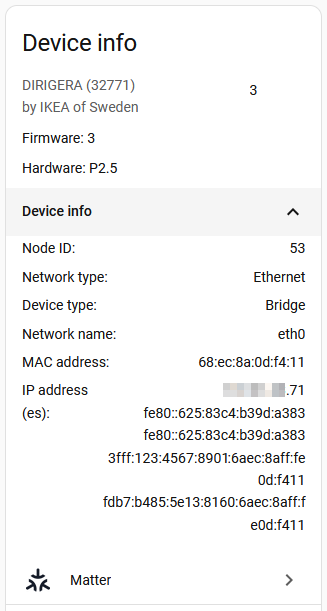
After powering up the DIRIGERA and upgrading its firmware using the IKEA Home smart app, as is the generic recommendation before attempting anything specific, I was able to add it to Home Assistant:
From the networking point of view, DIRIGERA now has:
- IPv4 address in my LAN
- IPv6 link-local address (somehow shown twice), as usual for all IPv6 devices
- A public IPv6 address
3fff:somethingin my LAN (autoconfigured by SLAAC) - An IPv6 unique local address (ULA)
fdb7:something
This ULA address is particularly interesting as that is not in any way generated by my network, it is from DIRIGERA itself.
(Additionally, after adding DIRIGERA in Home Assistant, I may or may not have also modified some of the Thread settings in Home Assistant regarding the Preferred network, or something else. Just sayin’.)
Now, when I tried to add for example the TIMMERFLOTTE sensor using the Home Assistant app on my Android phone, the attempts always successfully proceeded to “Connecting device to Home Assistant” but then failed with “Something went wrong“:
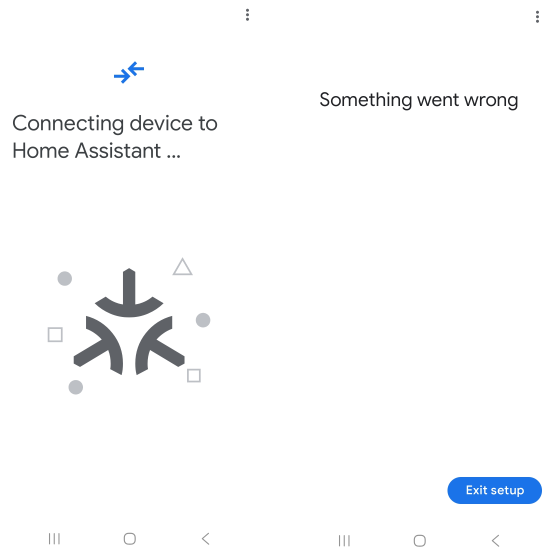
This was especially interesting because from the blinking of the pairing indicator of the sensor it could be seen that pairing was already successful at this point. Also notable was the fact that the sensor appeared in the phone’s Matter devices list properly.
These observations led me to think that Home Assistant is the reason for the problem in some way, not the Thread network or the hub.
Capturing the IPv6 traffic
Since my Home Assistant is running as HAOS on a virtual machine on a Proxmox VE host, I could easily start an SSH remote capture with Wireshark to capture the IPv6 traffic on the PVE host on the tap144i0 interface (connected to the HAOS VM), to see what is actually going on.
Right away I could recognize interesting Matter packets like this (the capture outputs on this page have been modified for readability):
> Frame 309: Packet, 160 bytes on wire (1280 bits), 160 bytes captured (1280 bits) on interface sshdump, id 0
> Ethernet II,
  Src: ProxmoxServe_f0:f9:95 (bc:24:11:f0:f9:95),
  Dst: PaloAltoNetw_80:46:10 (64:7c:e8:80:46:10)
> Internet Protocol Version 6,
  Src: 3fff:123:4567:8901::163,
  Dst: fd01:8778:467a:1:22b8:18fe:c7a7:e8d3
> User Datagram Protocol, Src Port: 50517, Dst Port: 5540
> Matter
Source is Home Assistant, destination is an unknown ULA address fd01:8778:467a:1:22b8:18fe:c7a7:e8d3, and the Matter packet is going to the firewall, due to the default routing.
Let’s have a network diagram right here:
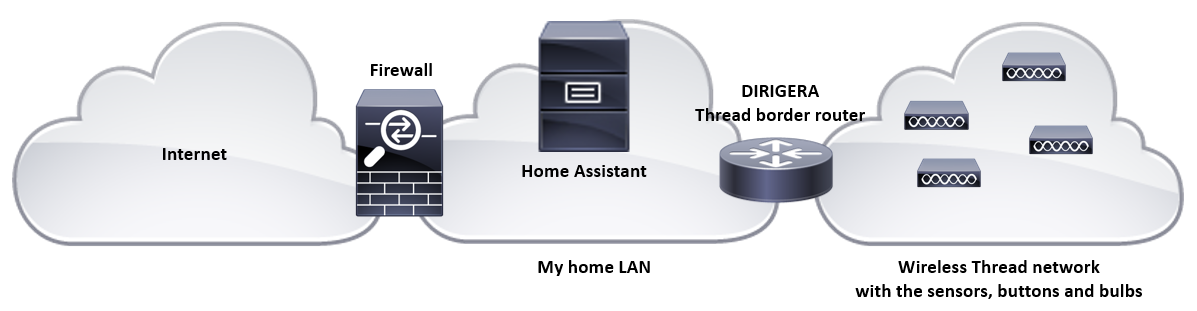
So, when adding the new sensor, Home Assistant somehow got the information about the fd01:something address to connect to, and since it didn’t have any other route for it, HA sent the packets to the firewall.
There were no return packets observed, which was natural as the fd01:something network was surely not behind the firewall.
After some additional detective work, I was able to see this every couple of minutes:
> Frame 384: Packet, 126 bytes on wire (1008 bits), 126 bytes captured (1008 bits) on interface sshdump, id 0
> Ethernet II,
  Src: IKEASweden_0d:f4:11 (68:ec:8a:0d:f4:11),
  Dst: IPv6mcast_01 (33:33:00:00:00:01)
> Internet Protocol Version 6,
  Src: fe80::625:83c4:b39d:a383,
  Dst: ff02::1
> Internet Control Message Protocol v6
     Type: Router Advertisement (134)
     Code: 0
     Checksum: 0xa5a5 [correct]
     [Checksum Status: Good]
     Cur hop limit: 0
   > Flags: 0x02, Prf (Default Router Preference): Medium, SNAC Router
     Router lifetime (s): 0
     Reachable time (ms): 0
     Retrans timer (ms): 0
   > ICMPv6 Option (Prefix information : fdb7:b485:5e13:8160::/64)
   > ICMPv6 Option (Route Information : Medium fd01:8778:467a:1::/64)
   > ICMPv6 Option (Source link-layer address : 68:ec:8a:0d:f4:11)
It is a router advertisement (RA) from the DIRIGERA hub, announcing itself as a SNAC router (Stub Network Auto Configuration) with route to fd01:8778:467a:1::/64, which happens to match the IPv6 destination address the Home Assistant was trying to connect to.
That fd01:something::/64 network is the wireless Thread network behind the Thread border router (DIRIGERA in this setup).
The on-link prefix fdb7:b485:5e13:8160::/64 also matches one of the IPv6 addresses of the DIRIGERA hub shown above.
Again, this router advertisement was captured right in the network interface of the Home Assistant virtual machine. But for some reason HAOS did not care about the RA, and thus it sent the packets destined to the fd01:something::/64 network to the firewall as usual.
The idea
After some serious thinking (= had a good sleep) I got an idea: My Home Assistant was configured with a static IPv6 address 3fff:123:4567:8901::163/64 in my home LAN. What if I changed it to Automatic instead?
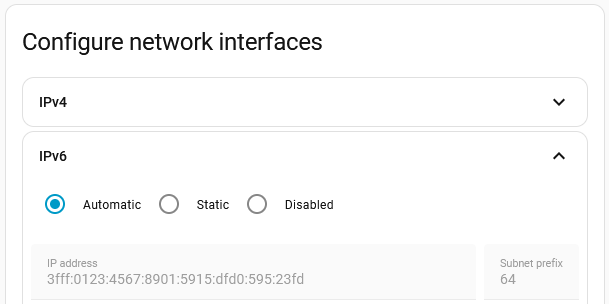
As it turned out, it made the world of difference. When attempting to add the sensor again in Home Assistant, it was successful!
Analysis
From the IPv6 routing point of view, when configured with a static IPv6 address, HAOS did not use the route received in the router advertisements sent by the Thread border router, leading the Thread-internal fd01:something network unaccessible. And when the automatic IPv6 addressing was enabled, HAOS started using the advertised direct route towards DIRIGERA, enabling the Thread network to be fully reachable from Home Assistant.
This is how some of the Matter traffic from Home Assistant to a sensor looks like now:
> Frame 2635: Packet, 96 bytes on wire (768 bits), 96 bytes captured (768 bits) on interface sshdump, id 0
> Ethernet II,
  Src: ProxmoxServe_f0:f9:95 (bc:24:11:f0:f9:95),
  Dst: IKEASweden_0d:f4:11 (68:ec:8a:0d:f4:11)
> Internet Protocol Version 6,
  Src: fdb7:b485:5e13:8160:610c:f5aa:cf05:22ef,
  Dst: fd01:8778:467a:1:cfe2:761b:cd1b:74b8
> User Datagram Protocol, Src Port: 50517, Dst Port: 5540
> Matter
In the IPv6 header there is the destination address from the fd01:8778:467a:1::/64 network, and in the ethernet header the destination address is the MAC address of DIRIGERA (the Thread border router in this setup), not the firewall anymore, so all looks fine.
That’s good detective work!
Finally, after several hours of debugging my issues with the matter server docker container, it turned out that the problem was the static IPv6 address on my host. 🤦♂️
Thanks for this post, helped me get everything working on my own setup!